B+ Trees, Buffer Pools and Blocks : The high-level memory hierarchy of database systems
Usually a database management system processes a statement like SELECT name, email from users WHERE age>30; and returns the result within milliseconds, but have you ever wondered what actually happens inside the database, and how the data travels from the disk to your screen? I want to walk you through the three main concepts that make this movement of bits and bytes from disk efficiently. The main goal is to make you understand the movement of data from the disk to the screen.
This isn’t the entire picture of the database internals , just an overview of how data is stored on disk, how it’s cached so it can be accessed quickly, and how it’s indexed.
Lets start with blocks.
Blocks(Disk Blocks)
At the foundation of DBMS, a disk exists. Most of the database systems now run on HDD(Hard Disk Drive with spinning magnetic platters), or NVME(Non-Volatile Memory Express ) solid state drives. Reading and writing from the disk is managed by a component called the disk manager. The disk manager has no concept of rows , tables or columns , the hardware strictly acts on sectors or blocks.
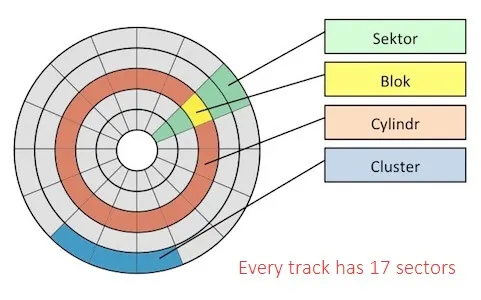
A Sector is the smallest unit a disk can read or write from. As you can see here, Hard disks are divided into 512-byte sectors, although Modern systems may use 4KB physical sectors(a format called “Advanced formats”).On a platter diagram, a single sector is shown as one slice of the disk, and a cylinder is the same track repeated across every platter at a given radius. In the diagram, the cylinder is the entire circle shown in orange, and the sector is the pie slice shown in green. A block is a logical grouping of several sectors, defined by the OS, which the next section explains.
Sectors are too small to work with directly ,thus the underlying Operating System(OS) and the File System can abstract these raw sectors into logical groups called as blocks. For example, sector 0 to 7 can be grouped into Block 0(4KB), sector 8 to 15 into Block 1 (4 KB) and so on…, When the DBMS requests data it goes through the OS file system to retrieve the data from the disk as blocks. Most databases rely on a standard OS file system(EXT4,XFS, etc.) for this, though some — Oracle used to ship their own proprietary file system , but most of them don’t do it because building a file system along with a dbms is a hassle.
To summarize , a sector is a hardware-level unit, a block is the OS/file-system’s logical unit built on top of sectors, and a page is the DBMS own logical unit built on top of blocks.
sector -> block -> pages
Interaction between the OS File system and the DBMS may lead to some problems,
Double Caching: The OS has a cache called as OS Page Cache, which helps for frequent retrieval of the files, but the DBMS also maintains its own cache(the buffer pool). Databases often use the O_Direct flag to bypass the kernel’s page cache and read/write directly to the storage. Torn pages: A database page is typically larger than the disk’s atomic write unit. If a crash happens mid-write only part of the page may make it , leaving a torn page that’s partly old data and partly new. Databases usually recovers the data using checksums and write-ahead logging(WAL), which let the system detect a torn page . Shameless plug but do check out my implementation of WAL in golang(https://github.com/SamarthSRao/Wal-Kv).
PAGES Because directly retrieving data as blocks might cause some issues as above, the DBMS uses a logical abstraction called Pages. All Relational data- including table rows, indexes and internal meta data is stored within these pages. Different databases can use different formats of pages, for e.g Postgres uses 8kb Pages, and mySql’s InnoDb engine uses 16kb pages.
Simple format of a Postgres Page:
An 8KB Postgres page is laid out as follows:-
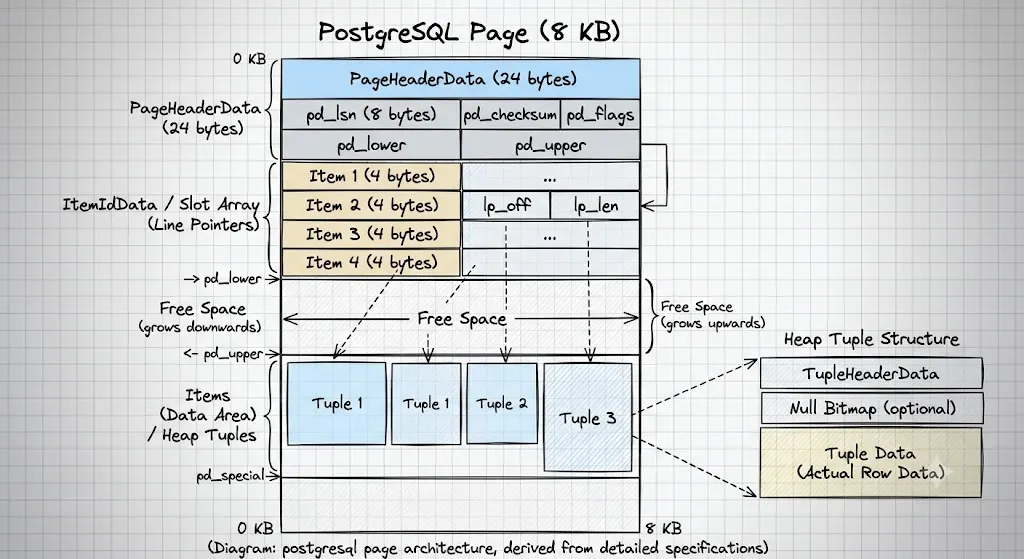
Each region in the above diagram serves a specific purpose
Page Header: Contains the metadata of the page
:- pd_lsn : required for the exact position of the last Write-Ahead Log entry that entered this page .Think of Write-Ahead-Log as an append only log structure in order to restore the database content in case of a crash.
:- pd_lower, pd_upper :- Used to mark the boundary of the unallocated free space, in the middle of the page.
:- ItemIdData ( line pointers) :- It used as an index directory for the tuple within a page. Every time a new tuple is inserted, a new line pointer is added. It acts as a slot array that keeps track of each tuple’s offset and its length within the page.
:-Free Space: Used to allocate new tuples when added
:-Items(heap tuples):
Tuples are just database talk for rows, the actual user table data lives .Each individual tuple has its own internal structure containing a Tuple Header and an optional Null Bitmap, in addition to the row data itself.
Organizing Pages into Files:
A single page holds a limited number of tuples(rows),and the data can be spread across many pages. We need to group these pages into files and have a way to track which pages belong to that file and where is it currently located.
Thus we look at how a DBMS organizes pages into files on a disk. At a higher level a DBMS operates on FILES of RECORDS, where FILES are a collection of pages. The most common structure for this is a heap file
Heap File Organization
A heap file is an unordered collection of pages ,with tuples that are stored in random order. It needs additional meta data to track which pages belong to the file and which pages have free space available. Two common ways are :-
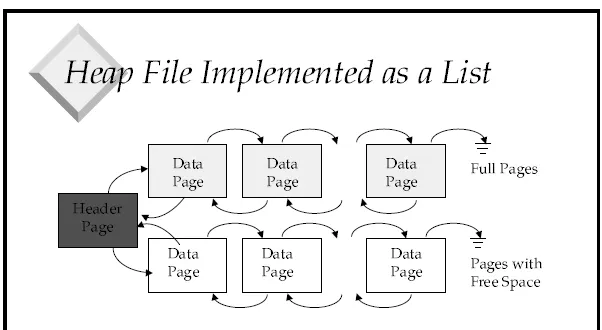
. As a linked list: a header page points to a chain of full pages and a separate chain of pages that still have free space, which pages linked to one another.
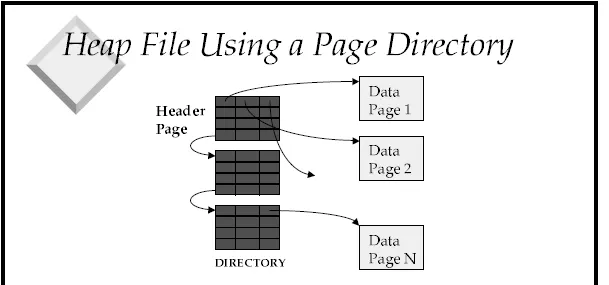
. Using a page directory:
the header page instead holds a directory of pointers, where each directory entry points directly to a data page. This avoids traversing through a linked list to find a page with free space.
There are also other methods of file organization such as :-
Tree file organization :- files are organized in a hierarchical tree structure, rather than an unordered collection
Sequential/sorted structure ( ISAM) : - records are stored in order by a specific search key column and can be located using binary search on the key
Hashing File organization :- a Mathematical hash function uses a record key in order to calculate the exact disk block address where the record lives .
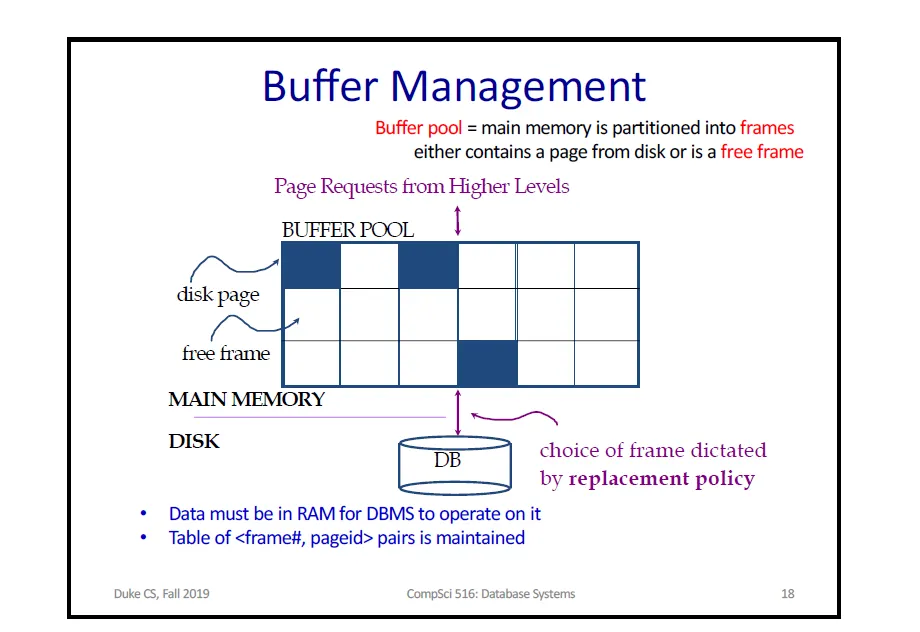
Buffer Pool:- While the OS handles the physical blocks and the DBMS structures them into pages, disk I/O remains the primary bottleneck in database systems. To reduce how often we need to access the disk, just like a CACHE, the DBMS keeps a massive contiguous chunk of memory ( buffer pool) to hold frequently accessed disk pages. The buffer pool is managed by the buffer manager.
The Buffer Pool divides memory into fixed-sized frames. Each frame either holds one page from disk or is currently empty(free frame). A table of <frame, page id> pairs records which page is present in a frame
When the query execution engine requires a certain page, it does not issue a disk read, It requests the page from the Buffer Manager which checks if the page currently resides in one of the buffer pool frame . If not, the buffer manager, loads the page from the disk and evicts an existing page that is not needed.
Press enter or click to view image in full size
For every frame the buffer manager tracks two values that maintains this:
a dirty bit :- whether the page present in the frame has been modified since it has been brought to memory, which is initially 0 or off.
pin-count :- number of active requests currently using a given page. The count is incremented each time the page is requested and decremented when released. A page with a non-zero pin count is considered “using” and cannot be evicted. This prevents pages that are still in use from being kicked out.
Loading a page into a frame follows this sequence:
first when a page is requested we check if the page is already in the buffer pool, if yes, we increment the pin count of that frame and return it
If it isn’t , the buffer manager chooses a frame for replacement using any replacement policy. If the chosen frame is dirty(modified prior ) we write its contents to the disk so that the modified data is not lost, and then we insert the requested page into the particular frame.
Some common replacement policies that we use to replace a frame are :-
LRU (Least Recently Used) :- evicts the page that hasn’t been touched for the longest time
Clock( an efficient implementation of LRU):- cheaper approximation of LRU that avoids the overhead of maintaining the metadata.
FIFO(First in First Out):- evicts the page that entered the buffer pool first, regardless of the usage.
MRU(Most Recently Used) :- evicts the most recently used page
B + Trees(INDEXING) The Buffer Pool reduces Disk I/O for pages that are already cached, but it does not change how many pages must be searched to answer a query. Scanning every page in heap file to find a small number of rows that is required is very slow. An index avoids this by letting the DBMS find rows quickly. Most databases use a variant of the tree data structure called the B-Tree .
B-TREES
A B-Tree is a balanced tree structure of order N , with the following properties:
: Each internal node( a node that is not the root or the leaf), holds roughly N/2 key/value pairs
: a node with k keys has k+1 children.
: The root has at least one value and two children
: All leaves sit at the same level.
Each node of the B-Tree can be sized to match the size of a page or at least the size of a disk block, so that reading a node costs exactly one I/O. B-trees work well on their own, but most databases use a variant called the B+tree instead.
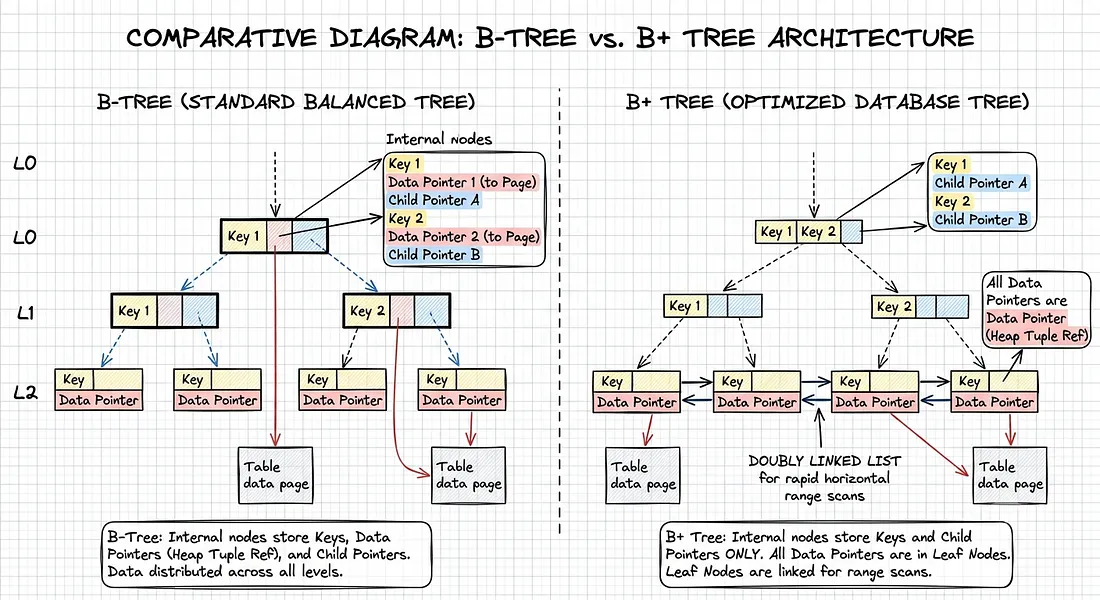
B+ Trees A B+Tree changes a few things compared to the original B-Tree:
:Key/Value pairs are stored only at the leaf nodes.
:Non-leaf nodes(internal) store only keys and the child pointer , it does not store any values.
: The most important is the leaf nodes are connected using next and previous pointers as a doubly linked list
Some of the main reasons B+ Trees are better for databases compared to B-Trees are
: Higher Fan-out: The inner nodes do not contain values and hence more number of key can be fit into each node. This means a shorter, wider tree ,fewer levels to traverse and fewer disk I/Os.
: Fast range scans: since all data lives in leaf nodes and those leaves are linked to one another ,a range query can find the starting leaf once, then walk across the linked leaves directly, instead of repeatedly returning to the tree.
all the values are stored in leaf nodes at the same level , the core property that makes B+ Trees so widely used.
CONCLUSION Thus we can say that each layer in a DBMS serves a part , addressing the limitations of the previous layer. The disk exposes only raw sectors, so the OS groups these sectors into blocks. Blocks are abstracted into pages by the DBMS with its own slotted architecture. Reading pages from disk on every request is slow, so the buffer pool caches them in memory, but caching alone does not reduce how many pages a query has to examine, and thus index typically a B+Tree helps the DBMS to locate the page faster.